Paddling Tracker: Measure Paddle Distance, Strokes & Efficiency
Paddle distance, stroke count, speed and efficiency show the work behind a surf. Gone Surfing tracks them alongside your waves, heart rate and GPS route.
How far do you actually paddle in a session?
You cover more water than you think. In the session shown below, Gone Surfing recorded 2,433 yards of paddling and 1,344 strokes. The app tracks paddle distance, stroke count, speed and efficiency automatically while you surf.
The four paddling metrics worth tracking
- Paddle distance: how much water you covered during the session.
- Stroke count: the total strokes, a simple measure of the session workload.
- Paddle speed: useful for paddle-outs and for the short efforts when you chase a wave.
- Paddling efficiency (ft/stroke): the distance gained per stroke.
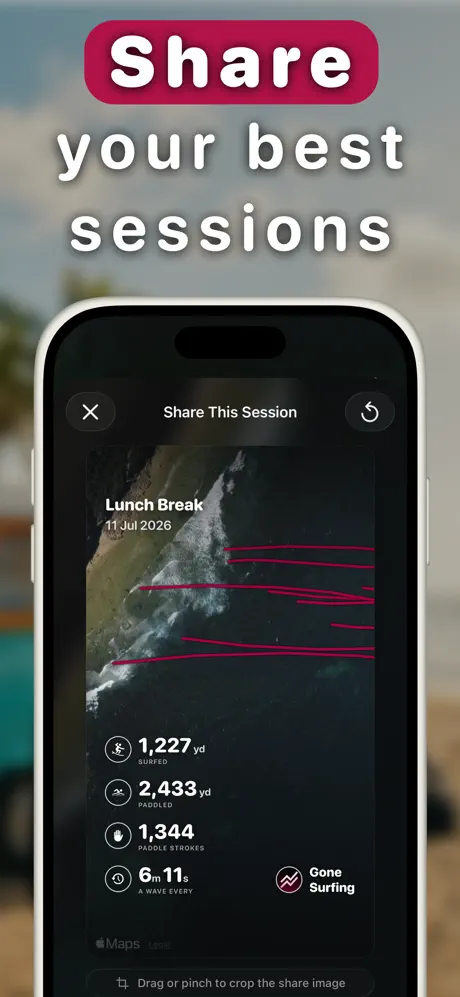
How to track your paddling with Gone Surfing
- Start a session on your Apple Watch. Paddle tracking runs automatically alongside wave detection.
- Surf normally. The app tracks distance, strokes and speed for the whole session alongside your rides.
- Open the session summary on your iPhone for paddled distance, stroke count, efficiency and your surfing-to-paddling ratio.
- Check the map. Your paddle routes show the paddle-outs, loops and long drifts that used up time between waves.
- Watch efficiency over time. The fitness dashboard charts ft/stroke across weeks and months.
What your paddle data tells you
Paddle distance and stroke count tell you how much work the session took. Efficiency tells you how far each stroke moved you. If you paddled a long way but caught few waves, check the map for drift or repeated repositioning. For endurance, follow your ft/stroke trend in the surf fitness dashboard.
Lots of paddling, few waves? Check the map. You may have spent the session fighting drift or circling back to the peak.
Track Your Paddle Data
Paddle distance, strokes, speed and efficiency, tracked automatically. Free to download.
Download Gone Surfing