Surfline Alternative for Surf Session Tracking
People search for a Surfline alternative for two very different reasons: they want a cheaper forecast, or they want better session tracking. Those need different answers, and conflating them is how you end up paying for the wrong thing.
Short answer
Surfline is primarily a forecast and camera service, so the right alternative depends on which half you are replacing. If you want to know whether it will be good tomorrow, you need another forecast provider, and Gone Surfing is not one. If you want to know what happened in the water, how many waves you caught, where you sat, how far you paddled, then a dedicated tracker like Gone Surfing does that job on Apple Watch without a forecast subscription.
Surfline does two jobs, and you may only need one
Surfline is best known for forecasts, reports and its camera network. Surfline Sessions adds wearable session tracking that can match your GPS track to clips from a Surfline camera, so you can watch waves you rode.
That camera-matched video is genuinely hard to replicate. It requires a camera network, and no independent tracking app has one.
But it only works where the cameras are. If your regular break has no Surfline camera, that half of the product does nothing for you, and you are paying for forecasts plus tracking you could get elsewhere.
What each option is for
| What you want | Best option | Why |
|---|---|---|
| Know if it will be good tomorrow | Surfline or another forecast service | Forecasting needs buoy data, models and spot-level knowledge. Gone Surfing does not forecast and does not try to. |
| Watch video of waves you rode | Surfline Sessions | Requires a camera at your break. No independent tracker can match this. |
| Count every wave accurately | Gone Surfing | Automatic wave detection on Apple Watch, tuned to catch slower and smaller waves. |
| See where you sat and where you rode | Gone Surfing | GPS session map with individual wave lines and paddling routes over satellite imagery. |
| Position better during the session | Gone Surfing | Real-time takeoff zone guidance on the watch, pointing back to where waves are breaking. |
| Track surf fitness and paddling | Gone Surfing | Paddle strokes, efficiency in feet per stroke, heart rate zones and endurance trends. |
| Track sessions without a subscription | Gone Surfing | Free to download and use, with optional Pro features. |
If you are replacing the tracking half
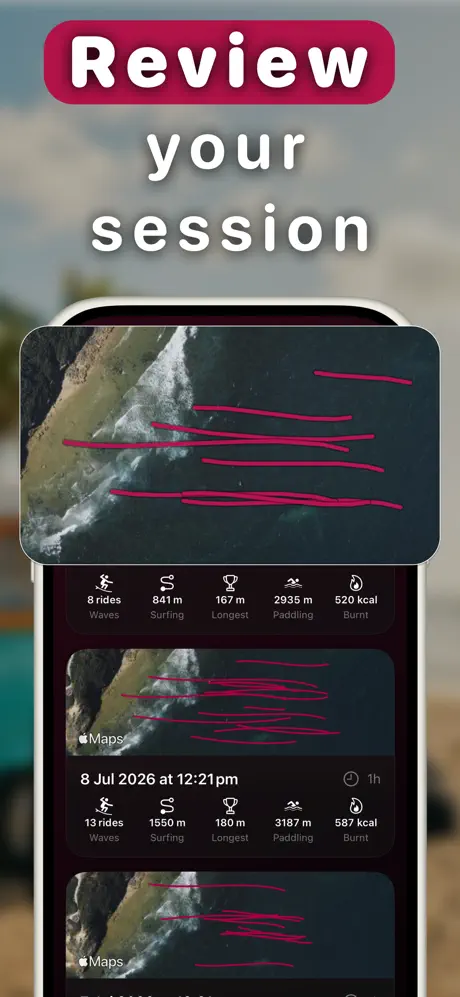
A dedicated tracker is built around one question: what happened in the water. Gone Surfing runs on Apple Watch, detects waves automatically, and draws each ride on a satellite map alongside your paddling route. Afterward you get wave count, ride distance and speed, paddle strokes and efficiency, heart rate zones, and an AI-written recap of the session.
The part that has no forecast equivalent is what happens during the session. Your watch shows an arrow pointing back to where waves have been breaking, so you spend less time drifting off the peak. A forecast tells you where to go. Takeoff zone guidance tells you where to sit once you are there.
See how GPS surf tracking works and how automatic surf logging works for detail on both.
Where Surfline is the better choice
Forecasting. This is not close. If you plan sessions around swell, wind and tide, you need a real forecast service. Gone Surfing does not provide one, on purpose. Building a mediocre forecast into a tracking app would help nobody.
Camera-matched video. If you surf in front of a Surfline camera regularly and learn best by watching yourself, Surfline Sessions does something no tracker can. Video shows you what your bottom turn actually looked like. No amount of GPS data does that.
Spot discovery and conditions reports. Travelling somewhere unfamiliar, Surfline's spot database and reports are a genuine advantage.
Plenty of surfers run a forecast app and a tracking app side by side, and that is a perfectly sensible setup. They are not competing for the same job.
Who should choose what
Choose Gone Surfing if
- You mostly surf breaks without Surfline camera coverage
- You want accurate wave counts and session maps without a forecast subscription
- You want real-time positioning help during the session
- You care about paddling and surf fitness data across sessions
- You already have a forecast source you trust and only need the tracking half
Stay with Surfline if
- Forecasts and conditions reports are the main thing you are paying for
- Your home break has a Surfline camera and you want video of your waves
- You travel often and rely on spot reports
Run both if
- You want Surfline for planning and a dedicated tracker for what happened. They do not conflict, and this is a common setup.
Sources checked
All links verified 29 July 2026. Features and pricing change, so confirm current details on the official pages.

Track what happened
Gone Surfing counts every wave and maps every ride on your Apple Watch, no forecast subscription required. Free to download.
Download Gone Surfing