Dawn Patrol Alternative for Apple Watch
Dawn Patrol is the surf tracker most surfers hear about first. If you are looking for an alternative on Apple Watch, the useful question is not which app is better overall, but which one matches what you actually want from a session.
Short answer
Gone Surfing is the closest Apple Watch alternative to Dawn Patrol, and the main difference is what happens during the session rather than after it. Both apps automatically count waves, draw your ride lines on a GPS map, record heart rate and distance, and save to Apple Health. Gone Surfing adds real-time takeoff zone guidance, an arrow on your wrist pointing back to where waves are breaking, which no other Apple Watch surf app currently offers. Dawn Patrol remains the better choice if you want Surfline Sessions video clips or a longer-established app.
Why surfers look for a Dawn Patrol alternative
From App Store reviews and messages I get, the reasons cluster into a few groups. Some surfers want more wave detection sensitivity, particularly on smaller or slower waves. Some want help positioning in the lineup rather than a report afterward. Some want deeper paddling and fitness analytics. And some simply want to compare options before committing to a subscription.
Those are different problems, and they do not all point to the same answer.
Gone Surfing vs Dawn Patrol at a glance
| Capability | Gone Surfing | Dawn Patrol |
|---|---|---|
| Platform | iPhone (iOS 17+), Apple Watch (watchOS 10+), Apple Vision | iPhone and Apple Watch |
| Automatic wave counting | Yes | Yes |
| GPS session map with wave lines | Yes | Yes |
| Real-time takeoff zone guidance | Yes, live arrow on the watch during the session | Not documented on the official product page |
| Surf fitness analytics | Paddle strokes, paddling efficiency in ft per stroke, heart rate zones, endurance trends | Speed, distance and Health integration documented |
| AI session recaps | Yes, AI Surf Coach | Not documented on the official product page |
| Surfline Sessions video clips | No | Yes, Surfline compatibility documented |
| Apple Health integration | Yes | Yes |
| Price | Free to download, with an optional Pro subscription | Check the current App Store listing |
Two notes on reading this table honestly. First, "not documented on the official product page" means exactly that: absence of public documentation is not proof a feature is missing. Second, Dawn Patrol's price changes often enough that its live App Store listing is the right source.
Wave detection: the difference surfers notice first
Wave counting is the feature every surf tracker is judged on, because it is the number you can check against your own memory of the session. Every app in this category uses some combination of GPS speed, direction and motion sensor data to decide what counts as a ride.
The tuning of that decision is where apps diverge. A conservative threshold misses small, slow and mushy waves. An aggressive one counts hard paddling over a set as a ride. Gone Surfing's detection is deliberately tuned toward catching the slower and smaller waves, which is what the sensitivity complaint usually comes down to.
One App Store reviewer described switching to Gone Surfing from another surf tracker:
"I could've caught 15-20 waves in a session but that app only tracks less than 5.. even on the slow waves setting! Gone Surfing app has a nicely dialed sensitivity to track all my waves caught."
That is one surfer's public review, not a measured benchmark. Sensitivity to slow, small waves is the difference reviewers mention most about Gone Surfing, and the tuning is deliberate: a conservative detection threshold misses exactly those rides.
For more on how automatic detection works and why apps disagree, see how to count your waves while surfing.
Takeoff zone guidance: the feature with no equivalent
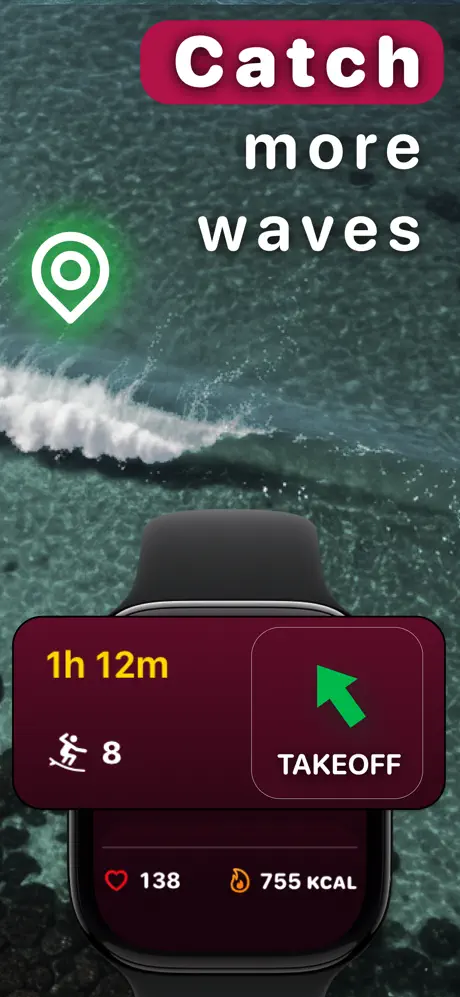
This is the clearest reason to pick Gone Surfing over Dawn Patrol, and it is worth being precise about what it does.
Most surf trackers are recording devices. They capture the session and hand you an analysis afterward. Useful, but the analysis arrives when you can no longer act on it.
Gone Surfing tracks where waves have been breaking during your session and shows an arrow on the watch face pointing back toward that zone. After a ride, when you are inside and disoriented and the lineup has drifted, you glance at your wrist instead of guessing. It helps most at unfamiliar breaks, in low visibility, and when current is moving you off the peak without you noticing.
I could not find an equivalent real-time positioning feature documented on any other Apple Watch surf app, including Dawn Patrol. See how to catch more waves for why positioning matters more than paddle fitness for most surfers.
Where Dawn Patrol is the better choice
There are real reasons to stay with Dawn Patrol, and pretending otherwise would make this page useless to you.
Surfline Sessions video. Dawn Patrol documents Surfline compatibility. If you surf in front of a Surfline camera and pay for Surfline, matching your GPS track to actual video of your waves is genuinely valuable, and it is something Gone Surfing does not do at all. For visual learners, watching yourself surf beats any chart.
Track record. Dawn Patrol has been on Apple Watch far longer, with a correspondingly larger user base and review history. Gone Surfing has far fewer ratings, and a small sample is a genuinely weaker signal than a long review record however good it looks. That is a fair thing to weigh.
Forecast and watch face features. Dawn Patrol's product page documents forecast and watch face functionality. Gone Surfing does not do forecasts, deliberately. It tracks what happened rather than predicting what will.
Who should choose what
Choose Gone Surfing if
- You want help positioning in the lineup while you are still in the water, not just a recap afterward
- You feel your current tracker is missing waves, especially smaller or slower ones
- You care about paddling analytics: strokes, efficiency in feet per stroke, endurance trends across sessions
- You want AI-written session recaps rather than raw charts
- You surf breaks without Surfline camera coverage, which is most breaks
- You want to try a full-featured surf tracker free before paying
Choose Dawn Patrol if
- Surfline Sessions video clips matter more to you than in-session guidance
- You regularly surf at Surfline camera spots and already pay for Surfline
- You want the longest-established Apple Watch surf app with the largest review history
- You want surf forecasts inside the same app as your tracking
Choose neither if
- You only want a basic workout record. Apple's built-in Workout app has a Surfing type, costs nothing and is already on your watch. See the Workout app compared to a dedicated surf app.
- You use an Android phone. Neither app supports it.
Do you need to try both?
No. Decide on the one feature that separates them. If you surf in front of a Surfline camera and want video of your rides, Dawn Patrol is the tool for that job. Otherwise Gone Surfing covers the same automatic counts, GPS maps and Health workouts, plus live takeoff zone guidance Dawn Patrol does not document.
If you still want to test both, alternate sessions instead of running them side by side. Two apps competing for GPS and sensor access on one watch drains the battery and muddies the recording.
Sources checked
All links verified 29 July 2026. Device support, pricing and features change, so confirm current details on the official listings before deciding.
- Gone Surfing on the App Store
- Dawn Patrol on the App Store
- Dawn Patrol official site
- Surfline Sessions
- Apple Workout app support

Try it on your next paddle out
Gone Surfing counts every wave, maps every ride, and points you back to the takeoff zone while you are still in the water. Free to download.
Download Gone Surfing