Surf Tracker for Apple Watch: The Complete Guide
To count waves and map your rides with an Apple Watch, start a session in a dedicated surf tracker before you paddle out. Gone Surfing handles automatic tracking and takeoff-zone guidance on your wrist, then shows the wave map and session recap on your iPhone.
Does the Apple Watch track surfing?
Out of the box, Apple's built-in Workout app has a generic "Surfing" workout type. It is a general workout log, not a surf-specific tracker with wave detection, surf maps or surf stats.
For wave counts, GPS wave maps, paddle distance and surf speed, you need a dedicated surf tracking app. Gone Surfing uses your Apple Watch to detect rides automatically, with nothing to tap in the water during the session.
What an Apple Watch surf tracker records
- Wave count: detected rides counted automatically, including slow, small waves
- Per-wave stats: distance, duration, top speed and average speed for each wave
- GPS wave map: your waves and paddling routes drawn over satellite imagery
- Paddling data: distance paddled, strokes, and paddling efficiency
- Fitness metrics: heart rate zones, calories burned, endurance
- Session trends: charts of your progress across weeks, months and all time
What the Watch and iPhone each do
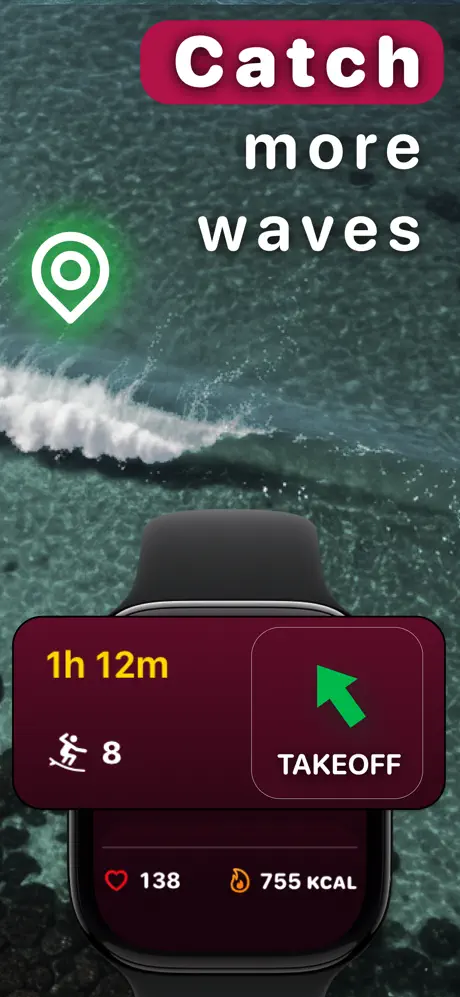
Use the Apple Watch for the part of the session that happens in the water: start and end tracking, see live wave count, time, heart rate and calories, and follow the takeoff-zone direction cue.
Use the iPhone for the fuller review. It is where you inspect the GPS map, individual wave details, charts, session trends and the AI Surf Coach recap after the workout syncs.
What a tracked wave looks like
In Gone Surfing's App Store screenshot below, Wave 15 covers 300 ft in 18 seconds, with a top speed of 18 mph and an average of 9 mph. The pink line shows that ride; the surrounding tracks give it context in the session.
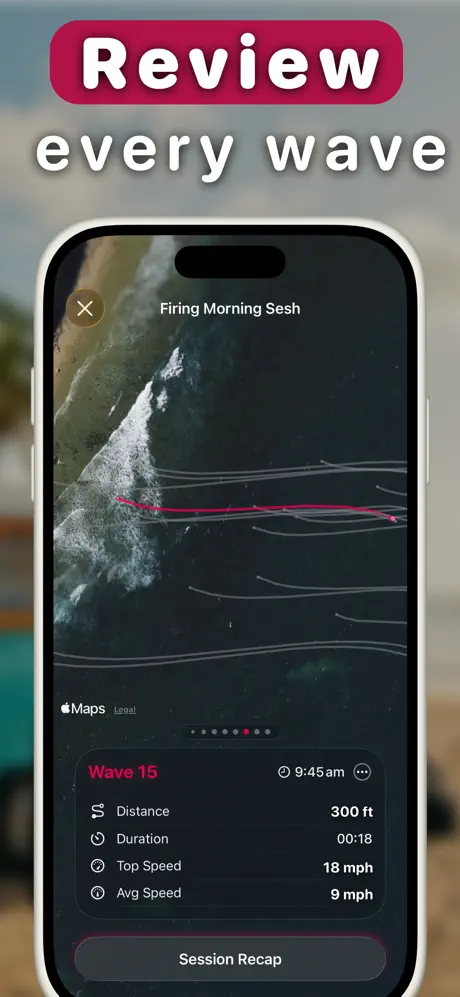
Start with the ride line, then look at where nearby rides began. That gives you a place to check on your next paddle back out. The takeoff arrow points toward your previous ride starts, so read it alongside the waves you can see breaking.
How to track a surf session with your Apple Watch
- Download Gone Surfing on your iPhone, then open the Apple Watch app.
- Open the app on your watch in the parking lot and tap start as you paddle out.
- Just surf. Wave detection runs automatically. Glance at your wrist for live wave count, session time, heart rate and calories.
- Follow the takeoff arrow. After a wave, your watch shows a direction back toward the area where your rides started.
- End the session and open the wave maps, charts and AI Surf Coach summary on your iPhone after the workout syncs.
Which Apple Watch works for surfing? Any model running watchOS 10 or later works. Charge it before a longer surf. Deciding on an Ultra? See Apple Watch Ultra 4 surf tracking.
Apple Watch surf tracking tips
- Wear the watch securely: keep it comfortable and stable while you surf.
- Let sessions finish syncing: your wave map and full stats appear on your iPhone after the workout data syncs.
- Check the widget: the Surf Dashboard home screen widget shows your last 30 days of waves, water time and surf days at a glance.
Does it work with Apple Health?
Yes. Gone Surfing saves sessions as workouts in Apple Health. Wave maps, wave details and surf-specific analytics stay in the app.

Turn Your Apple Watch Into a Surf Tracker
Free to download. Over 1,000,000 waves tracked in 2025.
Download Gone Surfing