Apple Watch Ultra 4 Surf Tracking: What It Does in the Water
Short answer: the Apple Watch Ultra 4 is built for surfing. Apple rates it to 100 meters including high-speed water sports, and it runs up to 18 hours of workout tracking on one charge. On its own it logs a generic Surfing workout. Install a surf tracker like Gone Surfing and it counts every wave, maps each ride over satellite imagery and points you back to the takeoff zone.
I built Gone Surfing for Apple Watch. Here is what the Ultra 4's hardware means once you paddle out, where it beats a cheaper watch, and where it doesn't.
Apple Watch Ultra 4 specs that matter in the surf
Only the specs that change anything in the water, with the Ultra 3 alongside for anyone deciding whether to upgrade.
| Spec | Ultra 4 | Ultra 3 |
|---|---|---|
| Water resistance | 100m, ISO 22810:2010, high-speed water sports | Same |
| Depth gauge | Dive-grade, EN13319 to 40m | Same |
| Water temperature sensor | Yes | Yes |
| GPS | Dual-frequency (L1 and L5) | Same |
| Battery, normal use | Up to 50 hours | Up to 42 hours |
| Battery, Low Power Mode | Up to 84 hours | Up to 72 hours |
| 15-minute fast charge | Up to 18 hours of use | Up to 12 hours of use |
| Peak brightness | 3000 nits, sapphire crystal | Same |
| Case | 49mm Grade 5 titanium | Same |
Specifications checked against Apple's Apple Watch Ultra 4 tech specs on 9 October 2026. Ultra 3 figures come from Apple's Ultra 3 spec page, checked 26 August 2026.
Does the Apple Watch Ultra 4 track surfing on its own?
Partly. Apple's built-in Workout app has a Surfing workout type that records time, heart rate and calories. It doesn't know when you caught a wave, so you get no wave count, no ride map and no per-wave speed. I covered the gap in detail in Apple Watch Workout app vs a dedicated surf app.
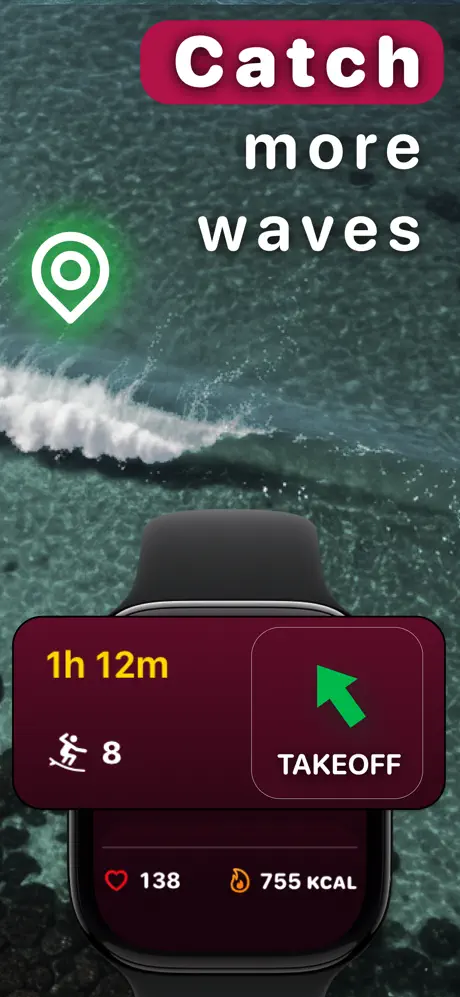
A surf tracker fills it in. Gone Surfing reads the Ultra's GPS and motion sensors to detect rides automatically, so you never touch the screen in the water. Your wrist shows live wave count, session time, heart rate and calories, plus an arrow back toward where your rides started.
Is the 100m rating enough for surfing?
Yes, and the wording is the part that matters. Apple's footnote clears the Ultra 4 for recreational scuba to 40 meters and "high-speed water sports." The Series 12 footnote says the opposite: "It should not be used for scuba diving, waterskiing, or other high-velocity water sports." Surfing sits closer to the second list than to swimming laps, which makes the Ultra the only current Apple Watch whose spec sheet covers it.
Apple also says water resistance "is not a permanent condition and can diminish over time." Rinse the watch in fresh water after a salty session.
How long does the battery last for a surf?
Apple rates the Ultra 4 at up to 18 hours of standard workout tracking, up to 25 hours in Extended Workout and up to 45 hours in Max Extended Workout. Apple tested those on outdoor runs with heart rate on and no iPhone, so treat them as ceilings, not session promises. A surf tracker samples GPS and heart rate for the whole session, which is the same kind of load.
Even a long dawn patrol uses a small slice of that rating. If you forget to charge, 15 minutes on the puck before you leave adds up to 18 hours of normal use, up from 12 on the Ultra 3.
What changes for surfers from the Ultra 3
Not much in the water. Same 49mm titanium case, same 100m rating, same dual-frequency GPS, same 3000-nit screen. The Ultra 4 adds 8 hours of rated battery life, faster top-ups, and a redesigned heart rate sensor that Apple calls its most accurate yet. That last one is Apple's claim; I haven't measured it in the surf.
If your Ultra 3 makes it through your sessions now, the Ultra 4 won't count more waves. Upgrade for battery, not tracking.
Do you need an Ultra to track your waves?
No. Gone Surfing runs the same wave detection on every supported Apple Watch, so a Series watch counts your waves just as well. The Ultra buys margin: the high-speed water rating, a 50-hour battery, and a 3000-nit screen for reading stats in bright sun.
It costs more than a Series watch, and the 49mm case is big on a small wrist. If you surf twice a month and charge every night, a Series watch is the sensible buy. If you surf most days, travel for waves or go out when it's big, the Ultra earns its price. For a wider look at the options, see the best Apple Watch surf apps.
How to track a surf session on the Ultra 4
- Install Gone Surfing on your iPhone, then open the Apple Watch app to add it to your Ultra 4.
- Open the app on your watch before you paddle out and tap start.
- Surf. Waves are detected and counted on their own. Glance down for wave count, time, heart rate and calories.
- Follow the takeoff arrow after each ride to get back toward where your waves started.
- End the session and open the wave map, per-wave stats and AI Surf Coach recap on your iPhone once it syncs.
The full walkthrough lives in the Apple Watch surf tracker guide. The Ultra's water temperature sensor shows readings in Apple's swim workouts; pair the number with the wetsuit thickness chart before you suit up.
Apple Watch Ultra 4 surfing FAQ
Can the Apple Watch Ultra 4 track surfing?
Yes. Apple's Workout app has a Surfing workout that logs time, heart rate and calories. To count waves and map each ride, run a surf tracker like Gone Surfing on the watch.
Is the Apple Watch Ultra 4 waterproof enough for surfing?
Apple rates the Ultra 4 water resistant to 100 meters under ISO 22810:2010 and lists high-speed water sports among its uses. Apple also says water resistance is not permanent and can diminish over time, so rinse it after salt water.
How long does the Ultra 4 battery last for surfing?
Apple rates the Ultra 4 at up to 18 hours of workout tracking, tested on outdoor runs with heart rate on and no iPhone. A dawn patrol plus an evening surf fits well inside that, and 15 minutes on the charger adds up to 18 hours of normal use.
Is the Ultra 4 worth upgrading to from the Ultra 3 for surfing?
Only if battery matters to you. The water rating, case size, screen brightness and dual-frequency GPS carry over from the Ultra 3. The Ultra 4 adds 8 hours of rated battery life and a redesigned heart rate sensor.
Do I need an Ultra to track my waves?
No. Gone Surfing runs the same wave detection on any Apple Watch with watchOS 10 or later. The Ultra buys a tougher case, a bigger battery and a brighter screen, not more waves counted.

Count Every Wave on Your Ultra 4
Free to download. Over 1,000,000 waves tracked in 2025.
Download Gone Surfing